
What we’ll look at
Four things that decide what your charity pays and how safe it is.
What you pay Microsoft
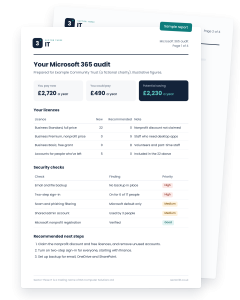
Your current plans and invoices, and whether they’re the right fit for how your team works.
Grants and discounts
Whether you can get free licences or Microsoft’s nonprofit discounts, and how much they’d save.
Licences nobody uses
Accounts for people who’ve left, and paid features that could be switched off.
Your security basics
Sign-in protection, backup and email filtering, and which gaps matter most for a charity your size.
What you’ll get afterwards
Within 48 hours of the call, we’ll email you a written report in plain English that you can share with your treasurer or trustees.
Before the call
It helps if whoever can see your Microsoft invoices joins. That’s often the treasurer, finance lead or operations manager. Trustees are welcome too.
We’ll never ask for your passwords. You don’t need to give us any access to your systems to have the audit.
Useful to have ready
How booking works

Choose a time
Pick a slot in our calendar and answer a few quick questions about your charity. It takes about two minutes.

Have the call
You’ll get a confirmation email with the Teams link, or we’ll ring you if you chose phone, plus a reminder the day before.

Get your report
Your written report arrives within 48 hours. We’ll offer a short call to talk it through, and that’s it unless you want more.
Pick a time that suits you
Choose a slot in the calendar on the right and we’ll send the details straight to your inbox. Can’t see a time that works? Call us and we’ll find one.
If you would prefer, give our team a call on 01582 620134 or email us at [email protected]
Questions about the audit
Yes. Use the link in your confirmation email to move or cancel the call at any time.
The report includes our prices so you can compare, but many of the savings are things you can make yourselves. We’ll offer one follow-up call and leave the decision with you.
The free audit is for UK registered charities. If you’re a CIC, community group or other nonprofit, call us and we’ll tell you what Microsoft offers organisations like yours.
No. We’ll ask questions and look at your invoices with you. We never ask for passwords.
It’s how most charities start working with us. Many find savings straight away. Some go on to use our packages, and plenty don’t, which is fine.